Build Software On Your Phone
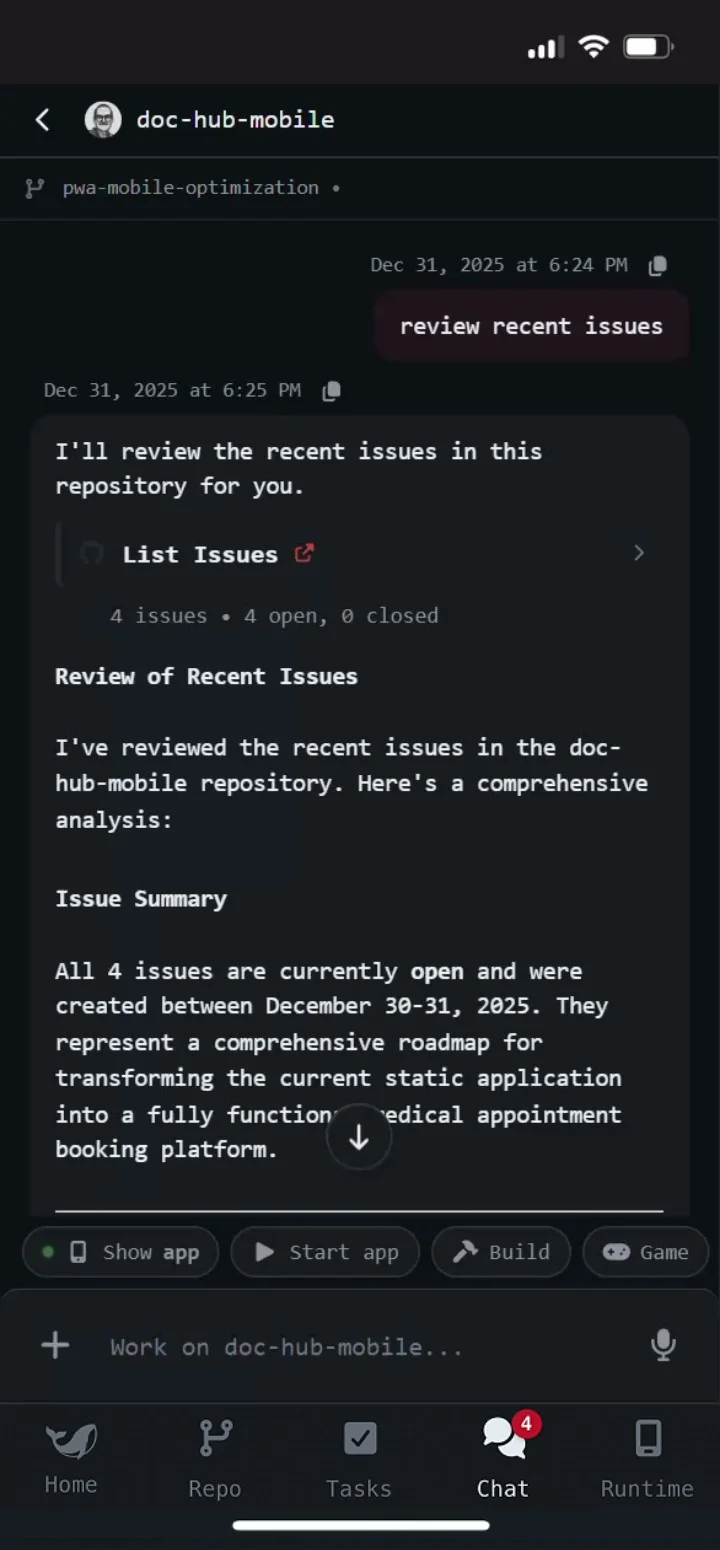
A full-featured AI-native development platform designed for the phone. Battle tested by professional software engineers.
Join our early access and see what developers are raving about


Join our early access and see what developers are raving about
Features For Professional Developers Who Use AI
AI-Native Coding
Supports Any Codebase
Live Development Environment
Deep GitHub Integration
Agentic Testing With Runnable Browser
AI-Powered Asset Pipeline
AI-Native Coding
Code with your AI agent just like on desktop with multi-turn conversations and full control over permission modes, MCPs, and parallel chats.

Supports Any Codebase
Use your existing codebase regardless of framework or architecture. From monorepos to microservices, work with your codebase natively.

Live Development Environment
Run localhost servers, reinstall dependencies, start dockers, do multi-repo development. Get full access to a complete development environment for you and your coding agent.

Deep GitHub Integration
Navigate CI/CD, PRs, and issues and monitor deployments with the help of AI.
Agentic Testing With Runnable Browser
Test your localhost in a live browser or watch the AI test your app step-by-step in a live stream of the browser

AI-Powered Asset Pipeline
Generate and iterate on images, videos, and media assets without leaving your workflow. Your agent handles cross-model prompting and refinement, inserting production-ready assets into your codebase for rapid prototyping.

AI-Native Coding
Code with your AI agent just like on desktop with multi-turn conversations and full control over permission modes, MCPs, and parallel chats.
Supports Any Codebase
Use your existing codebase regardless of framework or architecture. From monorepos to microservices, work with your codebase natively.
Live Development Environment
Run localhost servers, reinstall dependencies, start dockers, do multi-repo development. Get full access to a complete development environment for you and your coding agent.
Deep GitHub Integration
Navigate CI/CD, PRs, and issues and monitor deployments with the help of AI.
Agentic Testing With Runnable Browser
Test your localhost in a live browser or watch the AI test your app step-by-step in a live stream of the browser
AI-Powered Asset Pipeline
Generate and iterate on images, videos, and media assets without leaving your workflow. Your agent handles cross-model prompting and refinement, inserting production-ready assets into your codebase for rapid prototyping.
See Why Developers Are Using Portable Are Switching

"When I'd spot a bug or think of a new feature while away from my computer, I used to toss it into my notes app and hope I'd remember it later. Now I just open Portable, patch the code, test everything, push the changes, and watch the deploy to make sure it all works — all with just a few prompts. It's easily become my go-to tool for quick, on-the-go fixes."
Artur
@bucss
Luiz, @mococs
"Portable is why my side projects are finally moving. I'm coding anywhere while it tracks and fixes my changes for me. I simply log in with GitHub, see and test updates in real time, approve and merge. It's dead simple to get stuff done and is exactly what I needed."

"I'm no coder or dev, but Portable makes me feel like I can be. It's incredibly intuitive and easy, I'm pushing projects to GitHub like a pro, from anywhere!"
Jeshua
@vibejams
Edmund, @papercube
"I honestly didn't realize how much I needed this until I started using it. I love the freedom it gives me. Being able to fix things, review PRs, and push commits from anywhere makes me feel truly connected to my code, wherever I am."
"When I'd spot a bug or think of a new feature while away from my computer, I used to toss it into my notes app and hope I'd remember it later. Now I just open Portable, patch the code, test everything, push the changes, and watch the deploy to make sure it all works — all with just a few prompts. It's easily become my go-to tool for quick, on-the-go fixes."
Artur
@bucss
Luiz, @mococs
"Portable is why my side projects are finally moving. I'm coding anywhere while it tracks and fixes my changes for me. I simply log in with GitHub, see and test updates in real time, approve and merge. It's dead simple to get stuff done and is exactly what I needed."
"I'm no coder or dev, but Portable makes me feel like I can be. It's incredibly intuitive and easy, I'm pushing projects to GitHub like a pro, from anywhere!"
Jeshua
@vibejams
Edmund, @papercube
"I honestly didn't realize how much I needed this until I started using it. I love the freedom it gives me. Being able to fix things, review PRs, and push commits from anywhere makes me feel truly connected to my code, wherever I am."
Choose Your Plan . Start Coding on the Go.
Early Access
Access cutting-edge features and help us improve the app
Free
during early access
Limited seats available
All the features of the pro plan
Latest features as they're built
Direct group chat with the devs
Pro
For serious developers who need to do work on the phone
$
34.99
/
per month
Full GitHub integration
Unlimited active projects
500 server hours per month
AI coding assistance
Live preview & agent testing
Advanced voice mode

Got Questions? We've Got You Covered.
How does coding on a phone actually work?
How does coding on a phone actually work?
Portable gives you a remote development environment that you can access on the phone with AI-native coding assistance. If you code with AI on the desktop, you'll have the same experience coding with Portable. You can clone and work with multiple repos, run localhost servers with full frontend and backend, test in live browsers, and monitor deployments - all from your phone. The AI agent makes it easy to do complex work on the phone.
Do I need to set up my codebase in a special way, or can I use my existing repos?
Do I need to set up my codebase in a special way, or can I use my existing repos?
You can use your existing codebase as-is. Portable supports almost any framework or architecture - from monorepos to microservices. Just connect your GitHub account and start working on any of your repositories. The AI agent will help setup your environment for your codebase.
Is my code secure? Where is it stored?
Is my code secure? Where is it stored?
Your code and other files are stored in their own isolated container that's created just for you. Portable connects via OAuth and respects your repository permissions.
Can I use this for production work, or is it just for quick PRs or fixes?
Can I use this for production work, or is it just for quick PRs or fixes?
Portable is designed for serious production work. We support long development tasks that can take hours and we support multi-turn conversation that bring in multiple repos and frameworks. The app is already battle tested by professional software engineers all over the world!
What happens if my internet connection drops while I'm coding?
What happens if my internet connection drops while I'm coding?
When you reconnect, you can continue right where you left off. Any committed changes are already pushed to GitHub, and uncommitted work remains in your secure container until you're ready to commit.
What AI models can I use?
What AI models can I use?
Portable currently supports the anthropic family of models but support for OpenAI, Gemini, Grok, and more are coming very very soon! If there's a model you need today, feel free to request on our dev discord.
Can I test the code myself while it's running?
Can I test the code myself while it's running?
Yes! Portable includes a live browser environment where you can test your localhost servers in real-time. You can manually test your app or watch the AI agent test it step-by-step in a live browser stream, ensuring everything works before you commit and push.
Can I collaborate with my team using Portable?
Can I collaborate with my team using Portable?
Yes! Portable integrates directly with GitHub, so you can review PRs, respond to issues, monitor CI/CD pipelines, and collaborate with your team through standard GitHub workflows. All your team collaboration happens through GitHub as usual.
Is Portable compatible with Cursor, VSCode, and other desktop editors?
Is Portable compatible with Cursor, VSCode, and other desktop editors?
Yes! Portable works seamlessly with your existing desktop workflow. Since everything syncs through GitHub, you can switch between Portable on your phone and Cursor, VSCode, or any other editor on desktop. Make changes on your phone, pull them on desktop, or vice versa - it all just works.
Start Coding Now
Includes GitHub integration, AI assistance, and voice coding